Build an Odeva app
Odeva apps connect an organisation to external services such as payment providers, accounting tools, access control systems, reporting pipelines, or internal automation.
Use an app when the integration needs organisation-level configuration, installation, and API access. Use the JavaScript SDK instead when you are only building a public booking experience for a website.
1. Decide what the app owns
Section titled “1. Decide what the app owns”Start with one clear job. Good app boundaries are:
- Send invoices and payments to an accounting system.
- Connect a payment provider.
- Open doors or gates for confirmed stays.
- Export reservation, guest, or accommodation data to an internal dashboard.
- Add a custom booking or operational workflow for one organisation.
Keep guest-facing booking flows separate from back-office automation unless the same service truly needs both.
2. Register the app in Odeva
Section titled “2. Register the app in Odeva”An app is the record in Odeva that issues the API key your integration will use. Open Developer apps in the Odeva admin to create one.
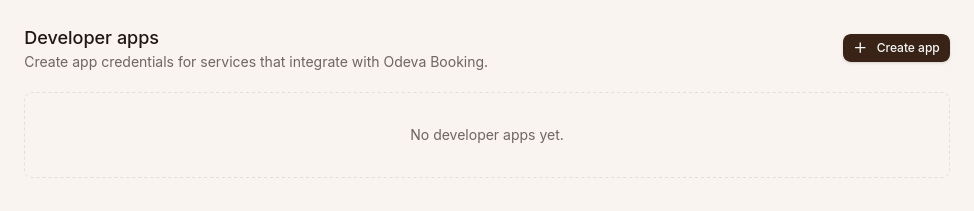
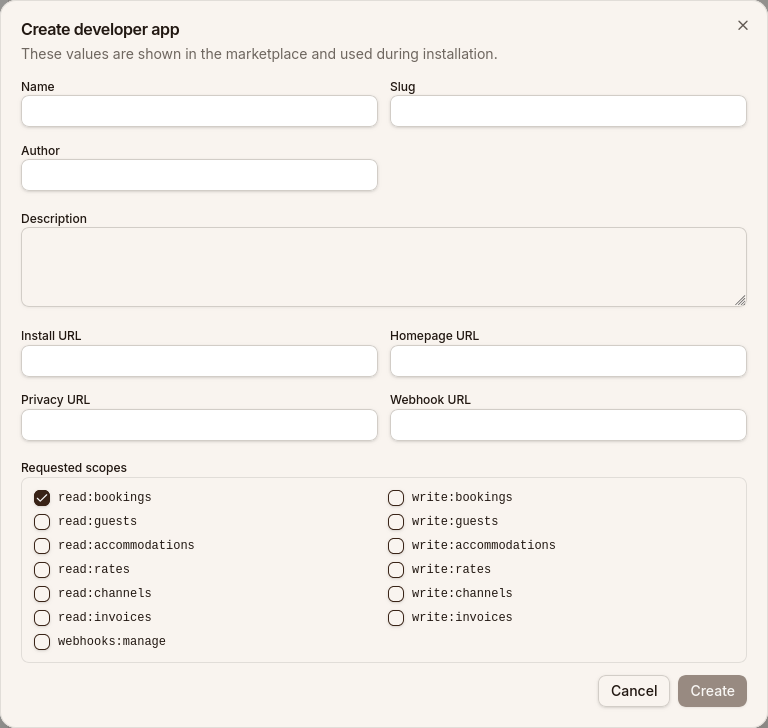
Click Create app and fill in the marketplace details. Select only the scopes your integration actually needs.
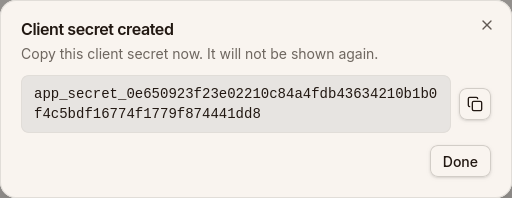
After creating the app, copy the client secret immediately. It is shown only once and cannot be retrieved later.
During development, keep the app private to the organisation you are testing with. Before publishing it more broadly, confirm the install path, required settings, and disconnect behaviour are clear.
3. Use the API key from your backend
Section titled “3. Use the API key from your backend”Never put the client secret in browser JavaScript, mobile app bundles, static HTML, or a public repository. Store it in server-side environment variables and call Odeva from your backend.
import { OdevaClient } from "@odeva/booking-sdk";
const odeva = new OdevaClient({  apiKey: process.env.ODEVA_API_KEY,  organizationSlug: "crystal-springs",});
4. Build the integration service
Section titled “4. Build the integration service”Most apps use a small backend service between Odeva and the external provider.
The service usually handles:
- Storing provider credentials or connection state.
- Calling Odeva with the API key from step 2.
- Mapping provider IDs to Odeva reservations, guests, accommodation, or payments.
- Retrying provider calls safely when a network request fails.
- Logging enough detail to debug a failed sync without exposing guest secrets.
For booking-specific flows, reuse the SDK methods for search, availability, pricing, and reservation creation from the JavaScript SDK guide. To react to reservation or installation events instead of polling, subscribe to webhooks.
5. Test the install flow
Section titled “5. Test the install flow”Use a test organisation first.
- Install the app.
- Confirm Odeva shows the expected active or connected state.
- Run one full workflow with real-looking test data.
- Disconnect the app and confirm the external provider stops receiving new updates.
- Reinstall the app and confirm it does not duplicate old provider records.
6. Prepare for review
Section titled “6. Prepare for review”Before sharing an app with other organisations, document:
- What data the app reads and writes.
- Which external provider receives data.
- How credentials are stored and rotated.
- What happens when the app is disconnected.
- Who operators should contact when the provider side fails.
Apps that touch payments, accounting, access control, or guest data should be reviewed with extra care because failures can affect money, entry, or privacy.